As you may know, the U.S. Department of Justice (DOJ) has issued updated ADA Title II requirements that mandate compliance with Web Content Accessibility Guidelines (WCAG) 2.1 AA standards. The UW must demonstrate substantial compliance by April 24, 2026. To support this work, you will receive periodic updates through spring 2026 with guidance and resources to support making accessibility part of everyday digital practice.
Document Repository
CBE ADA Resources – February 2026
Spring POP Sessions – Session 1 – Structured Headings (PowerPoint)
Spring POP Sessions – Session 2 – Accessibility Checkers 101 (PowerPoint)
Accessibility Events and Training
Digital Accessibility Calendar: This calendar tracks upcoming workshops, webinars, and community events centered around digital inclusion and universal design.
Digital Accessibility Training: This resource provides structured learning paths and training modules to help faculty develop their accessibility expertise.
Upcoming Events:
Spring Accessibility POP (Progress Over Perfection) Sessions:
POP sessions are 60-minute interactive workshops, each focusing on one particular accessibility topic or skill. Each session consists of instruction (20 min.); practice and question time (30 min.); and a wrap up with action item (10 min.). All sessions are held on Zoom on select Wednesdays, from 3:00-4:00 pm.
Register via the links below.
- April 1: Session 1—Structured Headings
- April 8: Session 2—Accessibility Checkers
- April 22: Session 3—Simple Alternative Text
- April 29: Session 4—Accessible Slide Design
- May 13: Session 5—Accessible Presentation Delivery
- May 20: Session 6—How to use Permalinks as an alternative to PDFs (NEW topic!)
- June 3: Session 7—Canvas Spring Cleaning: Pathway to Autumn (NEW topic!)
Past Events:
CBE UW-IT Digital Accessibility Presentation (Virtual): Thursday, March 12, 2026, 3 – 4 pm
Zoom Recording
We invite you to attend a presentation from UW-IT on digital accessibility. This session will provide a high-level overview of the Title II Rule, steps teams can take now, and where to find support and guidance. The presentation will be led by Beth Somerfield, Deputy ADA Coordinator for Digital Accessibility in the Civil Rights Compliance Office, and Mary-Colleen Jenkins, Instruction Accessibility Specialist with UW-IT’s Accessible Technology Services (ATS).
Expectations
Course Materials Checklist for Digital Accessibility: This serves as a guide that clearly outlines the digital accessibility expectations and standards required for the upcoming Spring Quarter.
Accessibility Checkers
Ally Accessibility Tool: The Ally accessibility tool serves as the primary benchmark used by the University of Washington to measure the digital accessibility of course content within Canvas. Understanding how this checker evaluates your materials is an essential starting point for identifying specific barriers and improving the overall accessibility of your course. Ally Course Accessibility Report Training
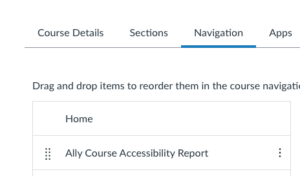
Note: If you don’t see the Ally Course Accessibility Report in your Canvas course, you must add it by clicking “Settings”, then “Navigation”, and then click and drag the Ally Course Accessibility Report button to the top section of the course navigation. This tool is not visible in the Student View of the course.
Accessibility Checkers and Tools: This page provides an overview of accessibility checkers and tools available to UW instructors.
Making Course Material Digitally Accessible
Making Course Materials Accessible: This site provides foundational best practices and instructions to insure the digital accessibility of course material. It is a vital resource for understanding the core principles of accessible design.
Tools for Making Material Accessible: This page provides a list of free tools and digital accessibility resources.
Accessible Technologies Help: This page lists support services and contact information for obtaining direct assistance with accessibility challenges. It is a key resource for when you encounter complex issues that require expert consultation or specialized troubleshooting.